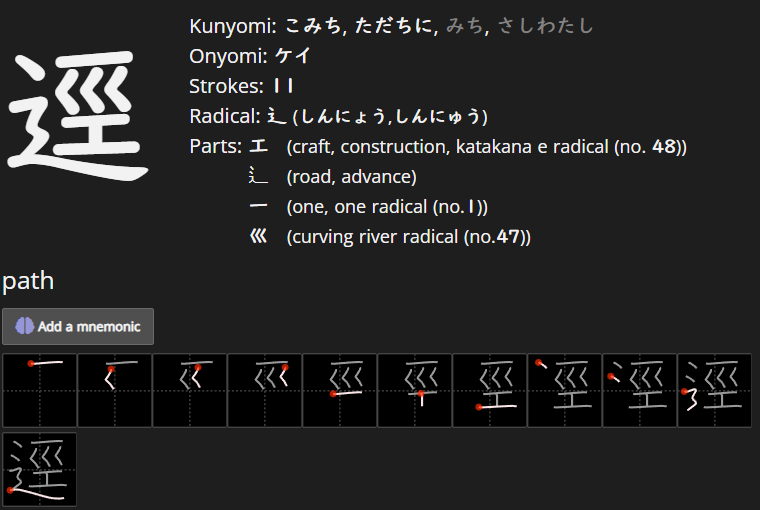
The diagram shows an extra drop above the radical, even though the kanji picture/questions does not show it. To my knowledge this is the only one like this as others are displayed correctly.
If you click through on ⻌ you’ll see that it actually goes to 辶
I don't understand what you mean. I know 辶 is related to ⻌, but I am refering to the kanji picture can mislead people as to being with a different kanji to what it is.
If you see a kanji being displayed that is different from the stroke diagram, the font is using the Chinese version. The stroke diagram uses the Japanese version. This occurs on some of the lesser used kanji.
For this kanji:
Chinese version use one drop, Japanese version uses two
Depending on the font that you use, it will show one or two.
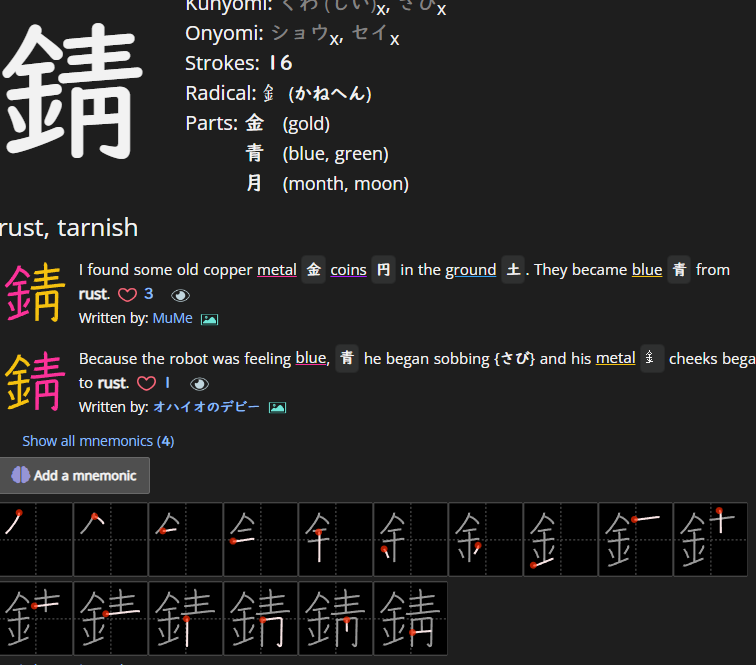
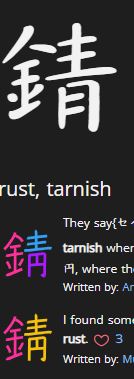
In some kanji you can see larger differences. e.g. 錆 the Chinese version uses a moon where the Japanese version uses a yen.
The thing is, for that kanji, there is no difference between the stroke diagram and the kanji picture (also I haven't changed my settings today, so the font should be the same).
(in case anyone is confused, I mean in the top left, no idea how to phrase it better, sorry if that confused you).
Here's what it looks like with the font I have today:
Some fonts will have the Chinese version for some kanji, and others will have the Japanese version for some kanji. It seems to be that the rarer the kanji, the more likely the font will use the Chinese version.
With my current settings, I rotate through about a dozen fonts, so I run across this from time to time.
The fonts that are used on renshuu are published by Japanese font companies, and I unfortunately do not have the ability to go in and do "spot" corrections on them - the two dots are the correct version, though.
I have experimented with the fonts, and though I don't have Renshuu Pro to test them all, the problematic one is the textbook font. That is the one displaying one drop. Fortunately, for me, my device is also in the correct Japanese format (learned a lesson from that), so I would type out 逕 and that should display the proper kanji. I'd also refer to other dictionaries as well to be sure.
If you're that worried, switch fonts and/or use other resources to double check.