On the risk of being the only one who needs something like this, let me still describe what I would like as a feature. I'm sorry for the long text, I just wanted to make clear what I'm trying to do.
I learn with textbooks and often they have a writing section where you practice writing out the kanji in actual sentences (e.g. they give you a sentence with blank and you fill out the blanks with the vocab, using as many kanji as you know).
Now practicing kanji writing in isolation is already very helpful for me, especially for the kanji that are standalone vocab as well. I use it a lot! However, when it comes to more more complex/abstract kanji, I might recall the kanji to the kanji definition, but I might not now in which vocab the kanji appears.
e.g. 経験
I know the first kanji means something like "pass" as in passage of time, and the second one something like "experiment". I don't have an issue practicing these with the kanji writing vector. However, when I'm asked by my textbook to write the word "experience けいけん" with kanji, I'm suddenly struggling "uh, which けい kanji was it again? 軽, 掲, 鏡?" Sometimes you can work with the kanji meanings, but there are also many kanji with kind of abstract meanings where you ask yourself how did they end up in this word? (probably some linguist could explain but can't research that for every word).
So that's why I find it helpful to add vocab to a schedule and practice writing out the vocab term as a whole (also helps with remembering the okurigana I find).
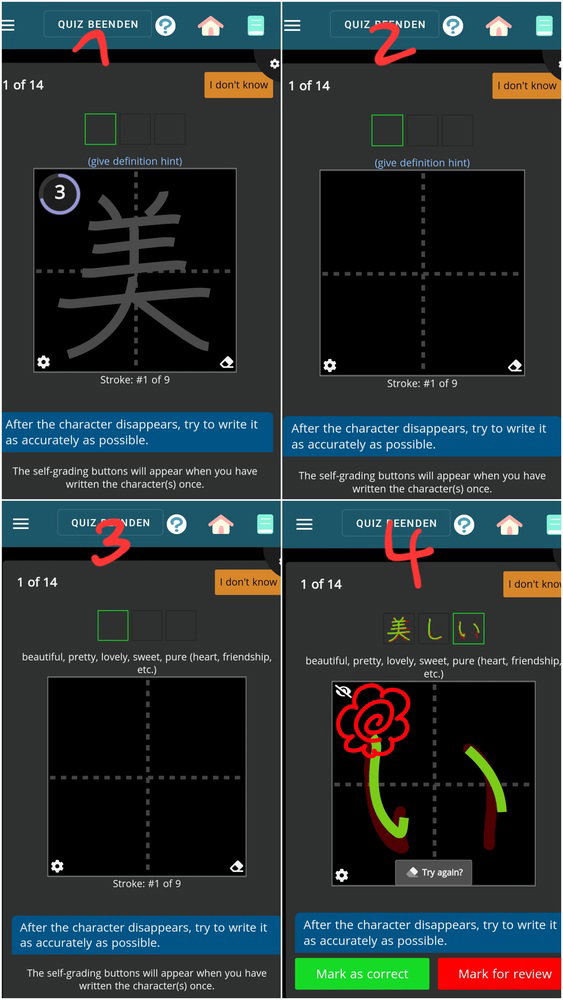
But when I use the writing vector, I can only choose from: 1) Show character and stroke order, 2) Show character only, 3) Show character, then disappear. Which I find helpful when I first write the word a few times. But at the end, I want to be able to write the word by myself without help. I tried closing my eyes until the trace disappeared and then writing out the word. Which works, but not well.
Comparing the kanji writing vector, there I have the option for these 3) plus 4) Only hints. That's great! That would be it! Don't show the trace, just the hint!
But vocab writing vector doesn't have this option. I was wondering why, since the kanji vector has 4 different options for character hints, why does the vocab vector only have 3? They're kinda built the same.
So what I do is, I don't use the writing vector. I use the kana -> kanji vector. Theoretically I could also use the meaning -> kanji vector, but that worked less well for me. I check "Type if possible" and then set my phone keyboard to handwriting recognition. The issue with this is: 1) google handwriting input doesn't care about stroke order and is very lenient if I make mistakes. 2) since there are many homonyms I have to guess to get a hint. 3) Don't have the neat box with the stroke by stroke assessment and the grid. 4) Can't do it on PC, since the writing input popup spoilers you and shows suggestions, 5) Can't collect XP on writing quests
I'm aware this is probably a unique problem and others may just use the writing vector differently, maybe I'm just weird for trying to make it work like this. Also I understand this is superrrrr low priority when there are more important things standing out. I'm very sorry to keep requesting things that probably no one else wants.