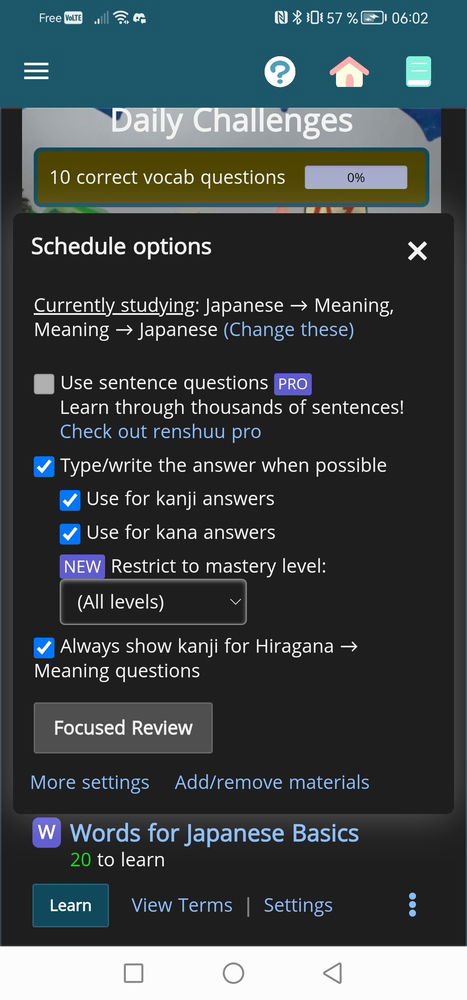
When I check "type/write the answer when possible" in one of my vocab schedules it still gives me multiple choice answers. This problem is only on PC, on the smartphone app it works just fine.
I actually have the same problem but on the mobile app, and I changed the settings before launching the quiz and tried twice, still got multiple choice questions each time
Are you sure these are kana or kanji answers? If they are English (definition) answers, fill-in-the-blank is not possible. It's also not possible for grammar questions.
If you still think it's a bug, feel free to tap the ? button at the top of the app and send in a quiz error report :)
I don’t think anyone has considered that application before. It’s no wonder it doesn’t work.
It does seem like this might be a useful thing to have. On the other hand, if you already know the kana well enough to type their readings, you’re ready to move on to the next step: typing in the readings of actual words.
Please tap the Settings link just below the schedule, and make sure you have all the "fill in the blank" options turned on.
Technically, those are definition answers, and so usually fill-in-the-blank is not available for them, but there is a special setting for the hiragana/katakana schedules.


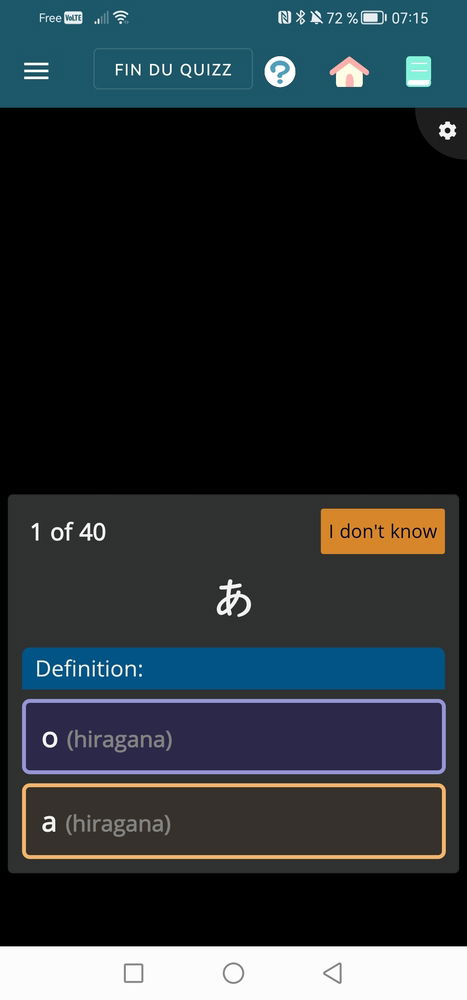 What I do not want