掲示板 Forums - Unable to delete quote blocks
Top > renshuu.org > Android renshuu Getting the posts
Top > renshuu.org > Android renshuu
If you delete the entire contents of a quote block when responding to a forum post, the empty quote block is still there. Pressing backspace doesn't delete it, and there seems to be no way to get rid of it.
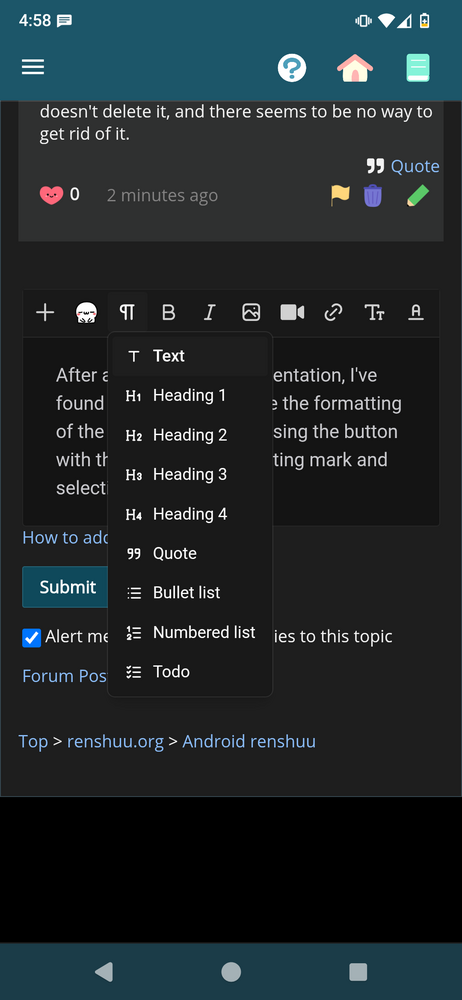
After a little more experimentation, I've found that you can change the formatting of the current paragraph using the button with the paragraph formatting mark and selecting "text."

Given that the browser version allows deleting quote blocks with backspace, I'm still not sure the behavior on Android is intentional, but at least there's some way to get out of the quote block.
So, I am able to delete the quote fully on desktop. It goes all the way to the beginning, then stops. After pressing delete again, the purple bar vanishes. So..it must be some other set of variables causing it. If you could show me a video of it happening, I'd love to see it.
In particular, I would not be surprised if the presence/absence of other text (before or after the quote) causes an issue, or perhaps the specific contents of the quote itself.
So, I am able to delete the quote fully on desktop. It goes all the way to the beginning, then stops. After pressing delete again, the purple bar vanishes. So..it must be some other set of variables causing it. If you could show me a video of it happening, I'd love to see it.
In particular, I would not be surprised if the presence/absence of other text (before or after the quote) causes an issue, or perhaps the specific contents of the quote itself.
While trying to show the issue in a screen capture, I figured out that it has to do with the keyboard being used. Here's a video showing the behavior I'm talking about:
odysee.com/@temporarychannelname:2/Renshuu-Android-keyboard-issue:0?view=shorts
I'm using /e/OS and the default keyboard is the AOSP keyboard. I also have a fairly obscure polytonic Greek keyboard installed, as well as Sumire Japanese keyboard.
With the AOSP keyboard, I frequently can't enter a new line with the enter key, but with the Sumire keyboard everything works fine (I actually had to switch to it to enter the new line for this paragraph). The same happens with the Greek keyboard - enter occasionally just stops working.
The frustrating thing for trying to track down the bug is that the behavior is inconsistent; the new line for this paragraph was entered with the AOSP keyboard with no problem. As far as I can tell, the best way to reproduce the newline issue is to create a new line, then delete it. After that, the enter key on the non-Japanese keyboards stops working.
For quotes, similarly, everything works as expected with the Sumire keyboard. With the other keyboards, once you delete all of the text inside the quote, the quote box can't be deleted, and tapping anywhere outside of the empty quote box loses focus on the post editor and causes the keyboard to disappear. Canceling the post and then reopening it results in the same behavior. Canceling the post and then tapping "quote" again results in a new quote being put above the empty quote box, and in that state, I can delete the empty quote box.
Hopefully this is enough to go on. If there are any other combinations or variables you'd like me to test, just let me know.
I am familiar in concept with e/OS, and AOSP, but I'm wondering if I (I have a stock android pixel) have access to the AOSP keyboard? The keyboard I'm using (gboard) can clear out the quote correctly, at least in limited testing.
It looks like it would require a rooted phone for you to install the AOSP keyboard (according to xdaforums.com/t/guide-install-lineageos-aosp-keyboard-on-any-phone.3828625/) so that's probably a no-go, but you can install "Fossify Keyboard Beta," which I've confirmed has the same problem, as a normal app. I also checked gboard and confirmed it can clear out the quote blocks normally.
Due to the narrow issue presented here, I cannot say when I'll be able to get to that, but I do have a few more things you can try if you'd like.
A keyboard is, naturally, nothing but a bunch of keycodes when received by the website (or whatever), so I am wondering if the keycodes are coming across differently for the different keyboards.
This page gives as much info as you can get: toptal.com/developers/keycode
I am wondering if the delete and the return buttons return the same values for each of the keyboards..
Results for gboard:
Backspace key:
{
"key": "Backspace",
"keyCode": 8,
"which": 8,
"code": "",
"location": 0,
"altKey": false,
"ctrlKey": false,
"metaKey": false,
"shiftKey": false,
"repeat": false
}
Enter:
{
"key": "Enter",
"keyCode": 13,
"which": 13,
"code": "",
"location": 0,
"altKey": false,
"ctrlKey": false,
"metaKey": false,
"shiftKey": false,
"repeat": false
}
Results for AOSP:
Backspace: no event registered (nothing happens)
Enter:
{
"key": "Enter",
"keyCode": 13,
"which": 13,
"code": "",
"location": 0,
"altKey": false,
"ctrlKey": false,
"metaKey": false,
"shiftKey": false,
"repeat": false
}
Results for Sumire:
same as for gboard
Results for Hoplite:
Neither backspace nor enter register an event. Pressing other keys registers key code 229, "process".
Results for Fossify:
same as for AOSP
no event?!?! How does that even happen? I'm honestly shocked - I thought they might be using something else, but to have no key response is, honestly, beyond bizarre. The only thing I can thing of is perhaps since there is not a field of text to delete, the backspace doesn't work?
Here's one more tool. Unfortunately, the textfield is also the output field, but without copying the text over, try this:
1. Press backspace when the field is empty
2. Press a different key (and get some output)
3. Press backspace again.
For the ones with no response, I'm wondering if #1 and #3 will be different.
That site is able to pick up key events consistently. It's a mystery to me as well why the toptal site didn't recognize deleting text as a key event, since I tried entering text and deleting it. The text keycodes registered, but backspace didn't.
For unixpapa, I see the following behavior for the keyboards where events weren't being registered before:
Interestingly, for the Sumire keyboard, if I enter a character, then press backspace, it also uses code 229. If I press backspace again, it uses code 8. In some cases, it enters code 8 when deleting a character, too. I think this input should reproduce the behavior: あ, backspace, か, backspace, い backspace, さ, backspace. All but the last backspace should use 229, the last one uses 8.
My guess as to the different behavior is that the AOSP keyboard uses backspace to undo autocorrect insertions. If it thinks a word is misspelled and punctuation, a space, a newline, or an emoji is entered, the misspelled word is replaced with the suggestion and the whitespace/punctuation/emoji is entered. If backspace is then pressed, there are three possible actions:
Unfortunately, turning off autocorrect doesn't change the behavior, it still uses keycode 229. For gboard, it still uses autocorrect, but pressing backspace doesn't undo the insertion.
On a related note, it looks like the way to get the Sumire keyboard to use code 229 is just to press backspace while a character is being edited (I assume because deleting the character might involve deleting one or more dead key inputs too). So さ -> enter -> backspace uses code 8, but さ -> backspace uses 229.
229 is apparently something I doubt I (or the text editor people) are going to get involved with, as it tends to mean "this is used internally by the keyboard for something else".
After reading all of this, my guess is that from the keyboard's perspective, when there is just the "outline" of the quote, the keyboard is thinking "there is no TEXT left, so nothing to delete". I'm honestly not sure how to get around this peculiarity of the keyboard software without putting in a *significant* (possibly 10s of hours) of work.
One thing I've found works well on another forum, which uses Xenforo, is that it allows you to edit posts in plaintext mode, so everything appears wrapped in tags instead of formatted. If the Renshuu text editor uses tag-based formatting under the hood, is that something that could be exposed to the user with a reasonable amount of effort?
It can, but I do not want to resort to that: it feels hackish.
I'll be honest - while the older version of the editor had a few quirks, it worked reasonably well. I don't want to move backwards to the older system, but the longer I use this one, the more weirdness I find. Despite having paid for it, I'm seriously considering jumping to another piece of software.