掲示板 Forums - Intermediate Grammar schedule suddenly not loading
Top > renshuu.org > Bugs / Problems Getting the posts
Top > renshuu.org > Bugs / Problems
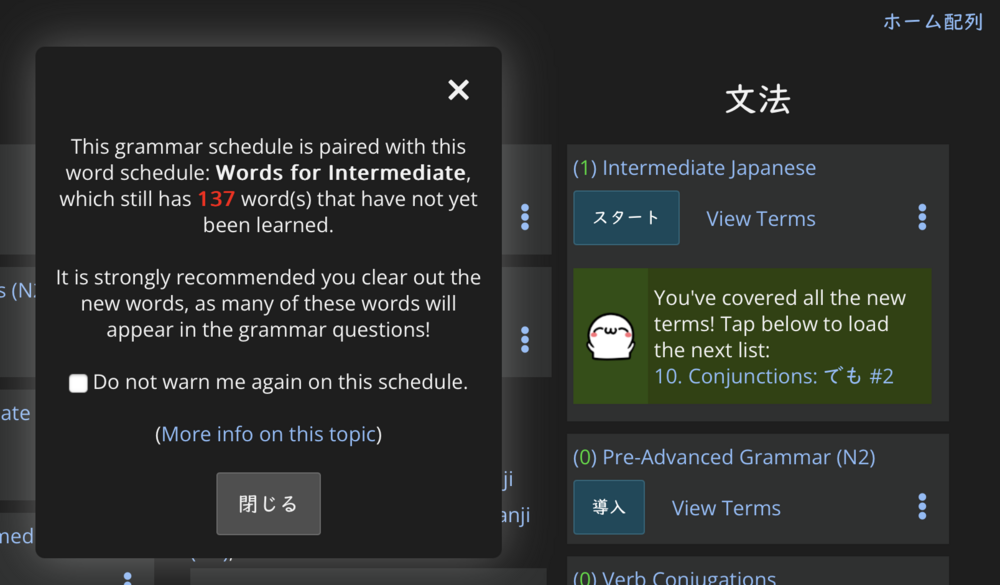
The Renshuu-made Intermediate Grammar schedule (ie the N3 level one) suddenly won't load. There's no message. Just nothing happens when I click the button. Please advise.
So I was using a laptop, but when I tried to load the same schedule on my phone, I got a warning that (apparently) I hadn't yet learned a lot of the words in the schedule. But then I checked ignore warning, now everything works fine (on both phone and laptop) again. Thanks anyway for quickly responding, Michael.
Yea - I suspect that the laptop had a slightly older copy of renshuu (that would have been fixed if you had closed/re-opened it).
I also got this warning today. It has no way to progress without selecting the checkbox, which would permanently hide it (I assume). This is blocking finishing the already studied grammar, even though I need to finish today's lessons and won't study new ones
I'd prefer to still get the warning in the future, only when trying to study new content. Would be nice to add a "Continue" button, and maybe a "Review only" or similar if it fits and lessons are pending, and it still always shows up.

I'll think on that, thanks. At the moment, though, I get a significant number of complaints because users will go too far in the grammar, not study the words, then think renshuu is not working correctly because the grammar questions have tons of words they've never learned.
I understand the intent and that most people are better served with guardrails.
To me the issue is that these new features are opaque. A new user has no idea about linked schedules, or why finishing one quiz will then result in another schedule now requiring additional studying today.
An indicator of linked schedules on the detail page (Vocab would link to Kanji + Grammar) of each may be useful. Finishing a quiz could indicate when new other content is unlocked and how much. Ex: "5 new Kanji unlocked"
An even bigger change of replacing the current schedule categories with a single group could work, treating progress as a single unit. All aspects could be under "N5 Beginner', and 'Start' would introduce Vocab, Kanji, or grammar depending on what is currently next in queue based on progress.
I could see that replacing the default schedule view, but still let people switch to Advanced mode (current setup) when ready
I think new users do know about it, as there is a popup at the beginning that guides them towards the vocabulary schedule, and explains why. Knowing how easy it is to forget what was in a one-time popup, though, I've added this.
I always think there is room for improvement, but making a different UI for these schedule pairs ("groups") would increase complexity, not decrease it. Based on what I've seen, people use schedules in a ton of different ways, and I am extremely hesitant to make changes to the workflow of all those users, both free and paid. If there is a change (and there is a reasonable chance this will happen in 2026), it'll be to let users group schedules into folders or order them in a non-alphabetical way.
The new popup does not force a change in any of this, though - it is simply a warning that can be dismissed. I feel it is reasonably conservative in reach so that it is informative, but can be ignored if desired.
Coming back to what you said before, though, expanding the panel slightly to allow additional options (perhaps split the "do not warn me" into "do not warn me until next lesson" and "do not warn me ever again", and I think this is definitely worth exploring.
To add to Gibolt, I have Grammar lessons I want to review, but I can't even do focused review due to the pop-up. I have something like 200 words to learn before I can continue and that's a long time to not be able to do any grammar review.
You can just tap the checkbox on the bottom to remove the warning :)
If you feel there is a change in wording that would make that action a bit clearer, I'd love to get some feedback on it!
From my point of view, I don't think the warning should appear if doing a focused review. If I want to study the things that need review, it's things I already studied without getting the warning, so the warning shouldn't apply. I want to avoid the issue that the pop-up is warning about, so I don't want to check the box. Does this make sense?
While a focused review is covering things grammar you have already learned, there is still a significantly good chance that the questions that come up during focused review will include those words that have not yet been learned. So in that way, there is no real connection to it and the grammar being learned for the first time. It's not tied to the introduction of the grammar, it is tied to the usage of vocabulary through all the questions for that grammar.
That's really weird to hear, because I've been doing the grammar lessons for about two weeks now with no issue. I'm not sure why I wouldn't be able to study that stuff again without running into the problem that (to me seemingly) suddenly appeared.
It largely depends on what you already known (vocabulary wise), if you are renshuu pro or not (renshuu pro has a much larger set of question sentences), and how particular you are to new words in sentences.
For some users, for example, trying to puzzle out a question involving a new(ish) grammar expression becomes MUCH harder for them if there are also words in the sentence that they are unfamiliar with. Other users in the same situation will not be bothered by that, and will either look up the word, try to infer it from context, etc.
The warning is *new* (as you no doubt know), so for users in the middle of a lesson (like you, and the others earlier in the thread) is going to feel a bit off, but I believe it will fit in much better when you cycle around to a new set of materials.
The issue that the box is describing can *still* happen to you, even if it hasn't happened in the last two weeks. It simply has to do with what sentences renshuu happens to be pulling up for you for the grammar questions, how often you study, as well as the order of the vocabulary terms themselves.
Each lesson contains a mix of two types of words: words that should be learned at that level for the equivalent JLPT exam, and words that are at that level which are contained in the grammar quizzes.
It could be that of the new words you have not yet studied, none of them are going to appear in the next grammar quiz that you take. Depending oh a number of factors (see above), the chance could be low, or it could be quite likely that you do not know enough vocab to be able to read the entire sentence.
So, in your case, even if you a)do not like to see new words in your grammar questions and b)you have not had any unlearned words in the last couple of weeks, it is still entirely possible for you to get new words in the very next grammar question. This does not matter if you are doing new grammar, or grammar that was introduced two weeks ago.
So if new words are not great for you in the grammar questions, I'd recommend finishing the vocab schedule. However, if one or a few new words (it's rarely more than 1 new word in a sentence), then you can just remove that warning. All it's doing it highlighting what is already on your dashboard (that there are still new terms in your vocab schedule), so even without the warning, you can check that before seeing if you want to do grammar.
I hope this better explains what is going on!
Thank you, for the explanation! I thought the pop-up was new to me, I didn't realize it was new altogether. If I understand correctly, it means I was probably being given words I didn't know, there was just no warning beforehand?
My last question is, let's say I click the checkbox to dismiss the warning, but now I'm in fact running into too many words I don't know. Would I be able to re-enable it if I want the guardrails back in place?
Exactly! The same problem existed before, there was just no warning. It led to a lot of frustration with other users, so thi sis an attempt to rectify that.
At the moment, the guardrails are an all or nothing thing. However, I am considering adding one more option: to "snooze" it until you reach the next grammar lesson.
Thank you again.
I think a snooze would be great. Gives me the chance to realize maybe you and Renshuu did know what's better than me.