Vocabulary dictionary

Kanji dictionary

Grammar dictionary

Sentence lookup

test
 

Forums - Restoration of hidden sentences

Top > renshuu.org > Questions about renshuu


avatar
Kerlione
Level: 1052

Hi!

I accidentally hid a sentence I was planning to make a suggestion to - I did press the Hide icon and started typing in the reason, but then closed the popup (via X) without submitting anything. After that I can no longer see the sentence, even though I can see it exists, using the Advanced Search, but no actual sentence would be displayed for me.

Is there any option to restore the visibility of such items myself?


For the context, I had the following item in my quiz 受け which was mapped to an incorrect (in my opinion) sentence - なった

In the sentence above the meaning is indeed 'to take' and not the one for the noun form of that (1. popularity, favour, favor, reception; 2. defense, defence; 3. agreement). It is also debatable if it is not the なう as such that should've been linked, but that's some different topic.

0
2 days ago
avatar

I’m sometimes able to see sentences I’ve hidden by searching for them on the sentences tab in the dictionary. Does that work for you?

Incidentally, I agree that the sentence isn’t a good example for 受け. 受ける seems like a better fit.

1
2 days ago
avatar

Searching them on the sentences tab in the dictionary doesn't work for me. I thought it might be possible to see them when viewing all of your sentences and filtering by "hidden from quizzes", but that doesn't seem to work either.

I know of one way of to get it back, but it's not practical for most people as it requires tinkering with the page source code. You'd also need another user or a second account.

1
2 days ago
avatar
Icepick87
Level: 609
ポールおじちゃん (0319, 9:21)

I’m sometimes able to see sentences I’ve hidden by searching for them on the sentences tab in the dictionary. Does that work for you?

Incidentally, I agree that the sentence isn’t a good example for 受け. 受ける seems like a better fit.

Not なう?

2
1 day ago
avatar

If なう was in the dictionary I’d vote for it, but it isn’t, so I can’t.

1
1 day ago
avatar
Icepick87
Level: 609
ポールおじちゃん (0319, 14:35)

If なう was in the dictionary I’d vote for it, but it isn’t, so I can’t.

The reason I say that is because ​I wouldn't agree it should be ける. ける is particularly when you verbify a noun, which in this case would be け. But the sentence is け, not the verb, with なう at the end. Two words. Therefore, なう. It appears for け simply because that's the word used for that sentence, but not the other since that one isn't part of that sentence.

I've seen a shorter variant of the sentence the OP was talking about, so I don't see much wrong with the sentence with respect to the word in question.

1
1 day ago
avatar
Kerlione
Level: 1052
ポールおじちゃん (0319, 15:21)

I’m sometimes able to see sentences I’ve hidden by searching for them on the sentences tab in the dictionary. Does that work for you?

Incidentally, I agree that the sentence isn’t a good example for 受け. 受ける seems like a better fit.

Unfortunately, the sentence disappeared from the Dictionary, too. I had it open while doing the quiz I faced it at, but since then had finished it. As a fun fact, I still can get that sentence in the quiz, but​ even though the answer has the same sentence in it, the sentences block is empty.


ギョルギ (0319, 15:44)

Searching them on the sentences tab in the dictionary doesn't work for me. I thought it might be possible to see them when viewing all of your sentences and filtering by "hidden from quizzes", but that doesn't seem to work either.

I know of one way of to get it back, but it's not practical for most people as it requires tinkering with the page source code. You'd also need another user or a second account.

​I can manage doing so. Also, I observed that I can see the same sentence in incognito mode, and even send a suggestion, even though I didn't try actually submitting it.


Icepick87 (0319, 21:25)
ポールおじちゃん (0319, 14:35)

If なう was in the dictionary I’d vote for it, but it isn’t, so I can’t.

The reason I say that is because ​I wouldn't agree it should be ける. ける is particularly when you verbify a noun, which in this case would be け. But the sentence is け, not the verb, with なう at the end. Two words. Therefore, なう. It appears for け simply because that's the word used for that sentence, but not the other since that one isn't part of that sentence.

I've seen a shorter variant of the sentence the OP was talking about, so I don't see much wrong with the sentence with respect to the word in question.

I would say that deciding which meaning (link) itself is correct is out of the scope of the current thread. kao_worry.png

(The remapping in the sentence can be done, the なう can be introduced, the meaning of 受け can be expanded to include the 'take' in it)

Nevertheless, thank you all for the input kao_heart.png

2
1 day ago
avatar

Alright, I'll explain how to do it, but only as a "last resort" if you never end up getting it back or you end up in the same situation again. Disclaimer: I don't think the element holds any account data, but if it does this won't work for you.

At a minimum you need to know how to access and navigate the Elements panel of the F12 Developer Tools Interface.

Here's the code of the element that holds the sentence in question: https://pastebin.com/2SAi0btU, you're going to need that in a bit.


This will be your starting point (sentence is hidden):
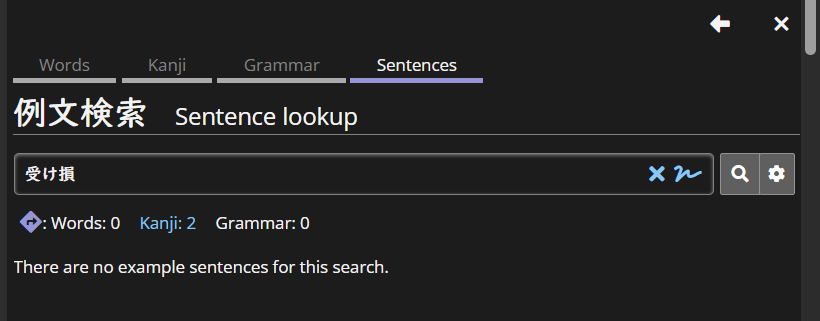
e03e1a0ba5512431ccc4a2e6.png

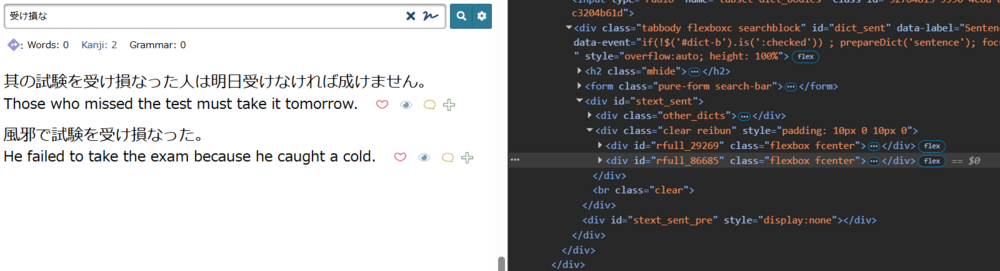
Now load any other sentences (doesn't matter which, or how many) and bring up the F12 Dev interface (Elements tab). This is Chrome, but it works similarly enough on most browsers. The element you want is the one with class="clear reibun" (should only be one currently loaded). There's a search function, but you can also use the "pointer" (left of "Elements").
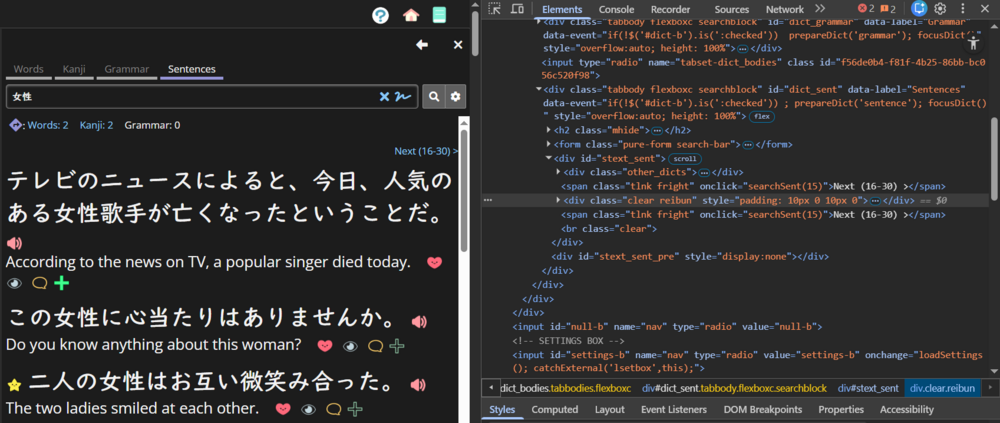
7f3e8f51205f72c957d05c16.png

Now, from those ... to the left you want to select "Edit as HTML" (or whatever your browser's equivalent is)
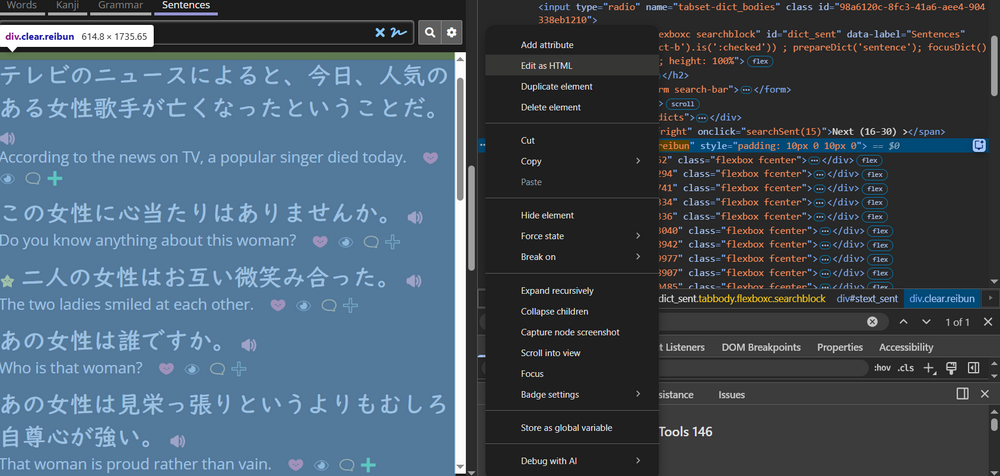
1c301c521e54c4db1900c540.png

Then you just want to paste the code from the Pastebin. When collapsed it should look like this (the "id='rfull_86685..." element):
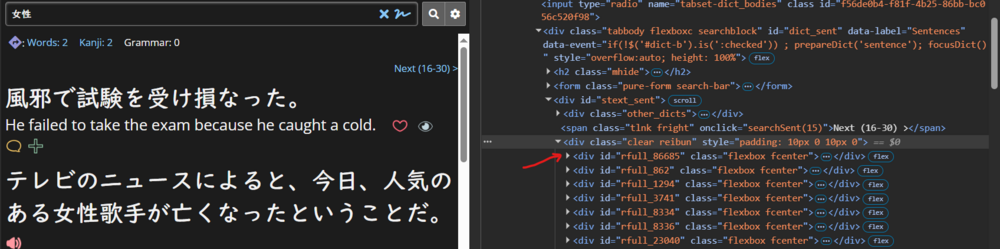
84850e4edb646a80912ef9db.png

Now you can just give it a like (heart), reload the page, and the sentence should be back:
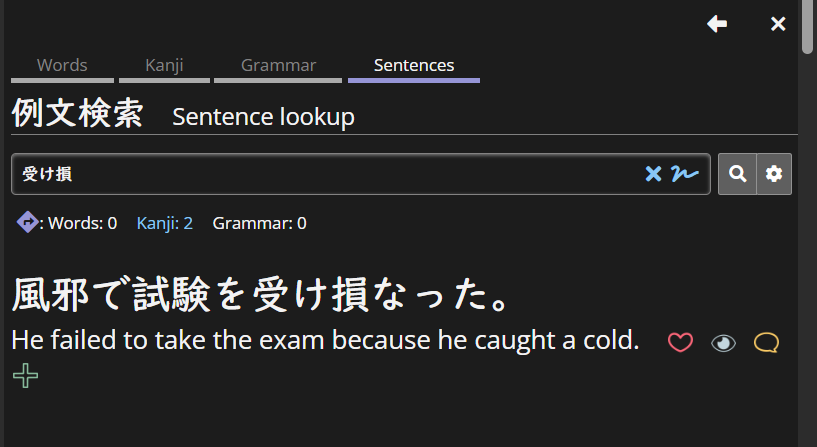
e9e0e06ad43bb465fd56f62f.png

Once again, I recommend trying this only after every other option has been exhausted. Michael might unhide it for you. I'm just giving it as an option.


PS: You can do this entirely on your own, you just need a second account to copy the element. Would probably work from an incognito window too.
afac6274b3d873819f79c331.png
1
1 day ago
Getting the posts


Top > renshuu.org > Questions about renshuu


Loading the list
Lv.

Sorry, there was an error on renshuu! If it's OK, please describe what you were doing. This will help us fix the issue.

Characters to show:


Use your mouse or finger to write characters in the box.
■ Katakana ■ Hiragana